

In a world where distractions are just a click away and hybrid teams are the new norm, staying productive has never been more challenging — or more important. Whether you’re managing a team, running your own business, or trying to stay on top of personal projects, online productivity tools have become essential for getting things done efficiently.
These tools are more than just digital helpers — they are the backbone of modern workflows. From streamlining communication to automating repetitive tasks and organizing complex projects, the right productivity tools for work can dramatically improve how individuals and teams operate.
But not all tools are created equal. Some are built to help you manage time better, others focus on collaboration, while many are designed to automate tasks or leverage AI to reduce mental load.
In this article, we’ll break down the most effective tools to improve productivity to help you choose what fits best for your needs and goals.
Let’s explore.
Project Management Tools
Project management tools help teams plan, track, and execute tasks — from simple to complex — with clarity and accountability. These platforms are essential for organizing workflows, setting priorities, meeting deadlines, and ensuring everyone is on the same page.
Trello
Best for: Visual task tracking with boards and cards
Trello uses a Kanban-style interface that makes it easy to visualize workflows. Teams can create boards for different projects, add task cards, set deadlines, and assign members — all in a clean, drag-and-drop layout.
Key Features:
- Customizable boards and lists
- Integration with apps like Slack and Google Drive
- Automation via Butler (Trello’s built-in tool)
Drawback: Limited features for complex project tracking unless you upgrade to Trello Premium.
ClickUp
Best for: All-in-one productivity and project management
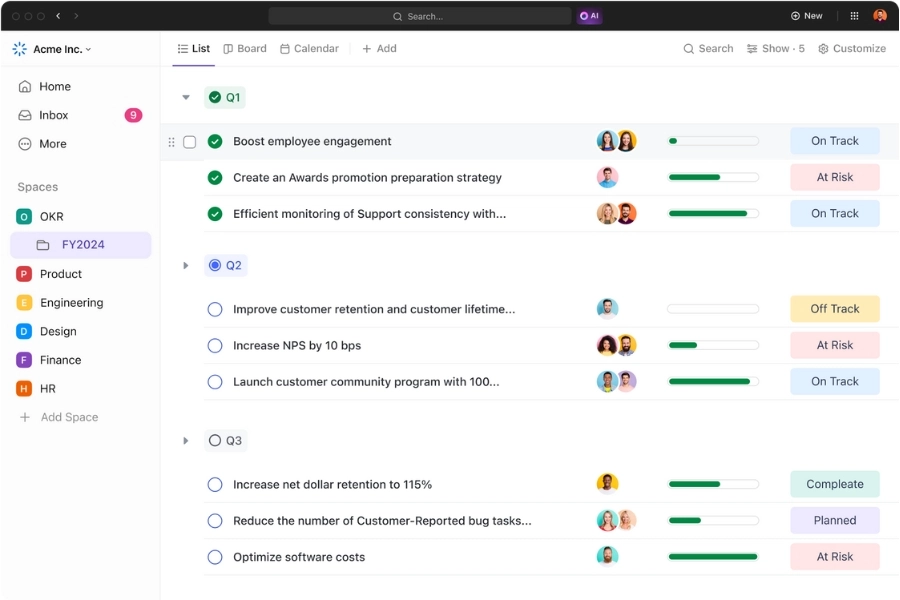
ClickUp combines task management, docs, goals, time tracking, and even chat into one workspace — ideal for teams that want everything in one place.
Key Features:
- Highly customizable dashboards
- Integrated time tracking and goal-setting
- Built-in docs and whiteboards
Drawback: Steep learning curve due to the range of features.
Asana
Best for: Teams that need detailed task management and project views
Asana provides multiple views (list, board, timeline, calendar), making it flexible for different types of teams. It’s great for managing dependencies, milestones, and workloads.
Key Features:
- Task assignments and due dates
- Timeline view for Gantt-style planning
- Project templates and automation features
Drawback: The interface can feel overwhelming for beginners.
monday.com
Best for: Visual project planning with team collaboration
monday.com offers color-coded boards that are intuitive and easy to adapt to different workflows — from software development to HR.
Key Features:
- Multiple project views (Gantt, Kanban, table, calendar)
- Automation and integrations
- Time tracking and workload management
Drawback: Some advanced features are locked behind higher-tier plans.
Wrike
Best for: Scalable project management for cross-functional teams
Wrike is a powerful project management tool built for larger teams and enterprises that need detailed visibility and reporting across departments. It offers dynamic request forms, advanced Gantt charts, and robust collaboration tools.
Key Features:
- Custom workflows and dashboards
- Time tracking and workload management
- Real-time collaboration and document editing
- Advanced analytics and reporting tools
Drawback: Can be complex to set up and configure for smaller teams or new users.
Looking for more tips and tools for project management? Check out:
Collaboration and Communication Tools
Clear, seamless communication is the foundation of any productive team. The right collaboration tools not only keep everyone connected but also ensure ideas and information flow without friction. Whether your team is remote, hybrid, or in-office, these tools help bridge gaps, break silos, and boost engagement.
Beincom
Best for: All-in-one communities that want to engage, grow, and monetize their digital presence, including: Companies & Enterprises, Fandoms & Fan Clubs, Learning & Sharing Communities, Web3 & Crypto Communities, and any professional networks.
Beincom is a next-gen social community platform that goes beyond messaging. It offers structured discussion threads and a unique Inner Circle Structure (ICS) that helps teams prioritize internal alignment. With token utilities like $BIC and a built-in Donation system, Beincom allows for both gamified and meaningful peer recognition.
Key Features:
- Structured, thread-based conversations
- Token-based rewards and donations via $BIC tokenomics
- Communication tools, social feed, knowledge base and sharing,…
- Tailored for both internal collaboration and external communities
Drawback: Still growing its feature set compared to legacy enterprise tools, but quickly evolving.

Ready to streamline collaboration and build a thriving community in one place? Try Beincom today — where productivity meets connection.
Slack
Best for: Fast-paced team messaging and app integration
Slack centralizes team conversations through channels, DMs, and threads, making it ideal for real-time communication. It also integrates with thousands of apps, from project tools to AI assistants.
Key Features:
- Channels for organized conversation
- Powerful integrations (e.g., Google Drive, Jira, Zoom)
- Slackbot and AI-powered search
- Huddles for spontaneous voice/video calls
Drawback: Can become cluttered and noisy if not properly managed.
Microsoft Teams
Best for: Microsoft 365-based organizations
Microsoft Teams is a robust tool for companies already using the Microsoft ecosystem. It combines chat, video conferencing, and file collaboration all in one place.
Key Features:
- Deep integration with Word, Excel, OneDrive, and Outlook
- Team channels and threaded conversations
- Built-in scheduling, calendar sync, and meeting recordings
- Secure file sharing and user permissions
Drawback: UI can feel overwhelming for first-time users.
Zoom
Best for: High-quality video conferencing
Zoom is synonymous with virtual meetings. With features like breakout rooms, whiteboards, and webinar capabilities, it’s a go-to tool for remote teams.
Key Features:
- HD video and audio conferencing
- Screen sharing and collaborative annotations
- Breakout rooms and waiting rooms
- Integration with calendars and CRMs
Drawback: Primarily focused on video; limited text communication features.
Google Workspace
Best for: Cloud-based file collaboration
Google Workspace (formerly G Suite) powers collaboration through Docs, Sheets, Slides, Drive, and Gmail. It’s ideal for teams that value real-time editing and easy sharing.
Key Features:
- Real-time co-editing in Docs, Sheets, and Slides
- Google Meet and Chat for communication
- Ample cloud storage with Google Drive
- Seamless permissions and version control
Drawback: Lacks advanced project management or time-tracking capabilities.
More tips to improve your team communication:
Time Management Tools
Time is your team’s most limited resource — and also the easiest to waste without realizing it. Time management tools help employees track how they spend their hours, identify inefficiencies, and build better habits. Whether you’re looking to improve focus, reduce distractions, or monitor productivity across teams, these tools can make a measurable difference.
Toggl
Best for: Simple and intuitive time tracking
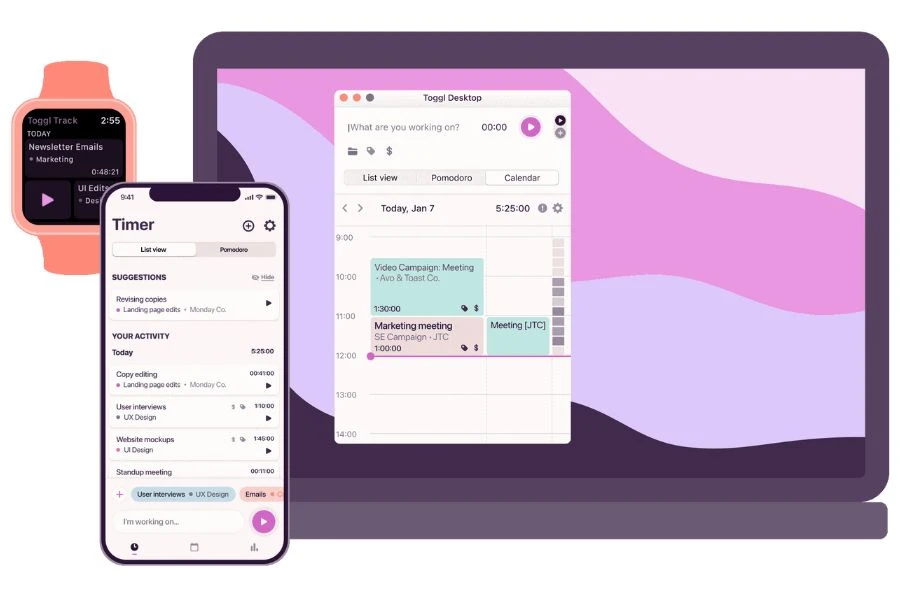
Toggl is a user-friendly tool that lets individuals and teams track work hours across projects. It’s especially helpful for freelancers, agencies, and companies that bill by the hour.
Key Features:
- One-click timer for effortless tracking
- Detailed reports and billable hours tracking
- Project budgeting and time estimates
- Integrations with Asana, Trello, and more
Drawback: Limited project management features compared to all-in-one tools.
RescueTime
Best for: Focus and productivity analytics
RescueTime automatically monitors app and website usage to give users insights into how they’re spending their time. It’s great for identifying distractions and creating focused work routines.
Key Features:
- Automatic time tracking and categorization
- Focus sessions and distraction blocking
- Daily and weekly productivity reports
- Goal-setting based on time use
Drawback: May feel invasive to some users due to passive data collection.
Clockify
Best for: Free time tracking for teams
Clockify offers a generous free plan and is popular among teams who want to track time across projects, clients, or tasks. It’s ideal for businesses of all sizes.
Key Features:
- Time tracker, timesheet, and calendar modes
- Team dashboard and productivity monitoring
- Billable hours and invoicing features
- Works across web, mobile, and desktop
Drawback: Reporting can get complex with large teams unless properly set up.
Forest
Best for: Reducing phone distraction and improving focus
Forest adds a gamified twist to time management by encouraging users to stay focused: plant a virtual tree, and it grows as long as you don’t use your phone. If you exit the app, your tree dies.
Key Features:
- Pomodoro-style timers for deep focus
- Gamified progress and tree planting
- Syncs across devices
- Supports real-world tree planting through partner NGOs
Drawback: Best for individuals rather than team-level use.
Time Doctor
Best for: Detailed time and activity tracking for remote teams
Time Doctor combines time tracking with screenshot monitoring and activity logging, making it suitable for companies managing distributed teams and contractors.
Key Features:
- Time tracking with optional screenshots
- Productivity reports and distraction alerts
- Payroll and client billing integrations
- Track websites, apps, and breaks
Drawback: The monitoring features may raise privacy concerns if not handled transparently.
Read more: 5 Best Time Management Techniques You Should Know
AI Productivity Tools
Artificial Intelligence is transforming how we work — automating repetitive tasks, generating content, and offering smart recommendations that save time and boost performance. The best AI productivity tools can help teams work faster, make better decisions, and focus on higher-impact tasks.
Notion AI
Best for: AI-powered note-taking and knowledge management
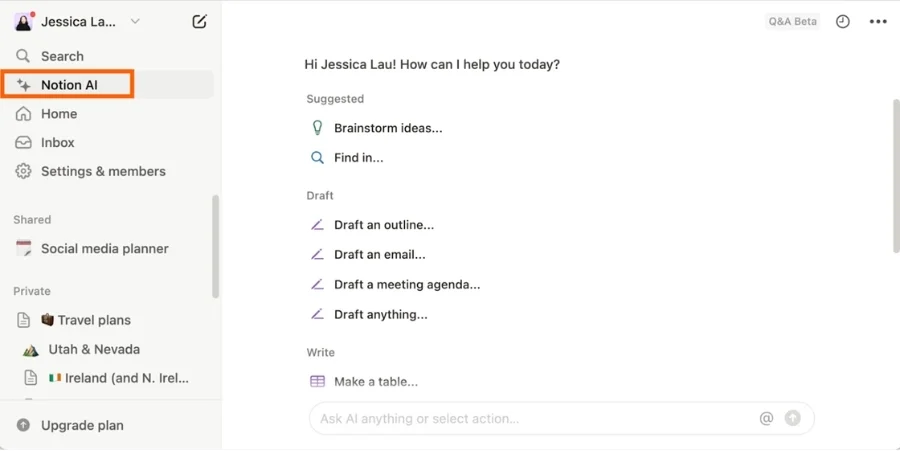
Notion AI enhances the popular workspace app with features like AI writing, summarization, and task management suggestions — all within your team’s docs and wikis.
Key Features:
- Generate and summarize content instantly
- Auto-fill tables, brainstorm ideas, or rewrite notes
- Works seamlessly with project pages and databases
- Saves hours of manual writing and formatting
Drawback: Can feel overwhelming to new users without a proper setup.
Grammarly
Best for: Writing assistance and communication clarity
Grammarly uses AI to improve grammar, tone, and clarity in real time. It’s especially useful for teams working across content, customer service, or internal communications.
Key Features:
- Grammar, tone, and clarity suggestions
- Plagiarism checker and style guides
- Works across web, email, documents, and more
- Enterprise plans for team collaboration
Drawback: Limited to text-based tasks — not useful for broader productivity.
ChatGPT
Best for: AI-powered idea generation and task support
ChatGPT is an advanced conversational AI that helps with everything from summarizing documents to writing code or generating emails. It’s like having a virtual assistant on demand.
Key Features:
- Brainstorming, writing, and research assistance
- Code generation and data analysis
- Custom GPTs for specific workflows
- Integrations with tools like Zapier or Slack
Drawback: Requires prompt clarity for best results; outputs may need review.
SaneBox
Best for: Email organization and focus
SaneBox uses AI to clean up your inbox by sorting unimportant emails into a separate folder, leaving only what matters in your primary view.
Key Features:
- Automatically filters low-priority emails
- Reminders and follow-up nudges
- Daily digests of sorted content
- Works with any email provider
Drawback: Requires a subscription and works best after some training.
Gamma
Best for: AI-powered presentation and document creation
Gamma lets users create polished presentations, decks, and docs using just a prompt. It’s ideal for replacing slide software like PowerPoint or Google Slides, and it adapts to modern, conversational presentation styles.
Key Features:
- Generate slide decks instantly with AI
- Edit content like a doc; present like a deck
- Interactive embeds and analytics
- Great for async team updates, pitches, and client briefs
Drawback: Limited offline capabilities and advanced formatting options compared to traditional tools.
Automation and Efficiency Tools
Automation tools help eliminate repetitive tasks, reduce manual errors, and save valuable time. These tools streamline your workflow so you and your team can focus on strategic, high-value work.
Zapier
Best for: Automating workflows between everyday apps
Zapier connects thousands of apps like Gmail, Slack, and Trello to help automate repetitive tasks. It’s ideal for non-technical teams that want to save time by setting up triggers and actions without writing code.
Key Features:
- Thousands of app integrations
- Multi-step workflows and filters
- Easy no-code setup
- Great for marketing, HR, and admin automation
Drawback: Can get expensive at higher task volumes.

Make (formerly Integromat)
Best for: Advanced workflow automation with rich customization
Make offers a visual editor that lets users build complex, branched workflows across hundreds of services. It’s powerful for operations teams and power users who want more control than Zapier offers.
Key Features:
- Drag-and-drop scenario builder
- Data transformation and webhooks
- Supports large-scale automations
- Flexible scheduling and error handling
Drawback: Steeper learning curve than other no-code tools.
IFTTT
Best for: Simple personal and business task automation
IFTTT (If This Then That) automates actions between popular apps and smart devices. It’s ideal for lightweight use cases, like triggering calendar reminders or syncing posts.
Key Features:
- Simple trigger-action automation
- Works with apps and smart home devices
- Great for personal productivity and solopreneurs
- Supports webhooks and RSS feeds
Drawback: Not ideal for complex business workflows.
Microsoft Power Automate
Best for: Automating business processes within the Microsoft ecosystem
Power Automate is ideal for companies using Microsoft 365, enabling automated workflows across Teams, SharePoint, Outlook, and more. It’s designed for both technical and non-technical users.
Key Features:
- Seamless integration with Microsoft apps
- Built-in AI tools and robotic process automation (RPA)
- Automate approvals, notifications, and data syncing
- Pre-built templates for quick setup
Drawback: Less intuitive than Zapier for non-Microsoft apps.
Tallyfy
Best for: Streamlining repeatable business processes
Tallyfy helps teams automate approval workflows, onboarding processes, and SOPs without needing code. It’s particularly useful for operations, HR, and client-facing teams.
Key Features:
- Visual workflow builder
- Track progress of each workflow instance
- Role-based assignments and conditional logic
- Built-in form creation and documentation tools
Drawback: Limited integrations compared to Zapier or Make.
Employee Productivity Software
These employee productivity tools help teams stay focused and efficient by tracking work habits, time usage, and output. They offer insights for managers and accountability for employees — especially useful in remote or hybrid settings.
ActivTrak
Best for: Monitoring and analyzing employee productivity
ActivTrak provides real-time insights into how employees spend their time. It helps identify bottlenecks, improve focus, and ensure workloads are balanced.
Key Features:
- Activity tracking with productivity categorization
- Real-time dashboards and reports
- Privacy-first monitoring approach
- Helps spot burnout risks and inefficient workflows
Drawback: May raise privacy concerns if not clearly communicated to employees.
DeskTime
Best for: Time tracking and productivity optimization
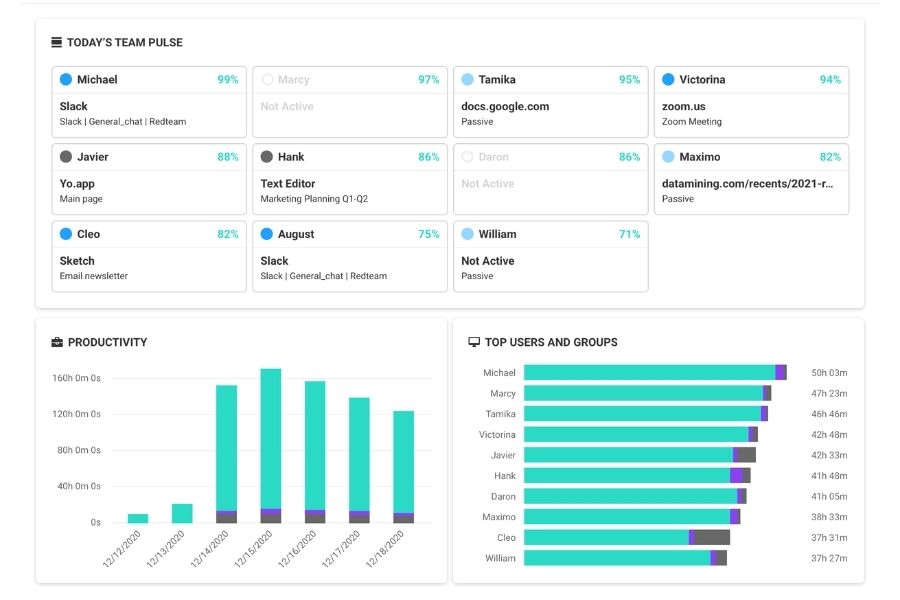
DeskTime automatically tracks time spent on apps and URLs to identify productive vs. unproductive behavior. It’s suitable for both remote and in-office teams.
Key Features:
- Auto time tracking with idle detection
- Categorizes productive/unproductive apps
- Attendance and project tracking features
- Integrated Pomodoro timer
Drawback: Some features feel limited in the free plan.
TimeCamp
Best for: Tracking billable hours and team productivity
TimeCamp combines productivity tracking with billing tools. It’s ideal for freelancers, agencies, and teams that need accurate time reports.
Key Features:
- Automatic time tracking
- Productivity analytics by task/client
- Invoicing and budgeting tools
- Integrations with major project management platforms
Drawback: Interface can be overwhelming at first.
Insightful (formerly Workpuls)
Best for: Remote team productivity tracking and workforce analytics
Insightful offers a suite of tools to track employee activity, manage remote work, and ensure accountability across teams.
Key Features:
- Employee monitoring and screenshot capture
- Time and attendance tracking
- Productivity trend reports
- Real-time activity dashboard
Drawback: May feel invasive for teams that value autonomy.
Teramind
Best for: High-security environments needing detailed behavior analytics
Teramind focuses on behavior analytics, insider threat detection, and compliance. It’s best suited for organizations with sensitive data and strict monitoring needs.
Key Features:
- User activity and behavior analytics
- Policy and rules-based alerts
- Screen recording and data loss prevention
- Granular control over monitoring settings
Drawback: Requires setup and buy-in from IT/security teams.
Choosing the Right Productivity Tools
With so many productivity tools and apps on the market, picking the right ones can feel overwhelming. The best tools for your team depend on your goals, workflows, and company culture. Here are some key factors to consider:
Identify Your Productivity Gaps
Before adding new software, pinpoint where your team struggles:
- Is communication slow or unclear?
- Are projects missing deadlines?
- Are employees burning time on repetitive tasks?
- Is time tracking or accountability an issue?
Once you know the gaps, you can choose tools that directly address them.
Prioritize Integration
Choose tools that work well with what you already use. For example:
- Project management tools should sync with your calendar or Slack.
- Time trackers should integrate with billing systems.
- Collaboration platforms should support file sharing and video calls.
Integration reduces friction and ensures smoother workflows.
Focus on Usability
Even the most powerful business productivity tools won’t help if your team hates using them.
- Look for clean, intuitive interfaces.
- Test user onboarding flows.
- Read real user reviews — especially for your industry or team size.
If adoption is easy, impact comes faster.
Consider Scalability
Your productivity tools should grow with you.
- Can they support more users or projects as your team expands?
- Are there advanced features available for future needs?
- Does pricing scale reasonably?
Avoid switching tools too often by choosing ones built for long-term growth.
Balance Cost vs. Value
Free productivity tools can be great, but paid options often offer better support, customization, and features.
- Start with a free trial.
- Compare pricing tiers.
- Ask: will this save us time or money in the long run?
The right productivity tools should feel like an investment, not an expense.

Conclusion
Productivity tools for work aren’t just about getting more done — they’re about working smarter, streamlining collaboration, and unlocking your team’s full potential. Whether you’re managing projects, improving communication, tracking time, or leveraging AI, the right tools can make a measurable impact on performance and morale.
But tools alone won’t transform your workflow. Success comes from choosing solutions that fit your team, encouraging adoption, and continuously refining how you work. Start small, stay flexible, and let technology support your path to better results.


