Managing projects can be overwhelming without the right tools—missed deadlines, scattered tasks, and poor collaboration slow down progress. The good news? There are powerful free project management tools that help you stay organized, streamline workflows, and boost team productivity.
In this guide, we’ll explore the best free options and how to choose the right one for your needs.
What Makes the Best Free Project Management Tool?
The best free project management tools strike a balance between usability, essential features, and scalability. While paid plans offer advanced capabilities, a good free tool should provide enough core functions to manage projects effectively. Here are the key factors to consider:
User-Friendly Interface
A clean, intuitive design ensures that team members can navigate the tool effortlessly, reducing the learning curve and enhancing productivity. An effective project management tool should be accessible to all users, regardless of their technical proficiency.
Task Management
Robust task management capabilities allow teams to create, assign, and prioritize tasks efficiently. Features like due dates, checklists, and progress tracking are essential for keeping projects on schedule and ensuring accountability.
Task management is just one piece of the puzzle. Streamline your process with a standard operating procedure.
Collaboration Tools
Seamless communication is vital for project success. Integrated chat functions, file sharing, and real-time collaboration features enable teams to work together effectively, regardless of their physical location.
Read more: 10 Best Group Chat Apps for Effective Team Collaboration
Integration Capabilities
The ability to integrate with other software applications, such as email platforms, calendars, and file storage services, enhances a tool’s versatility. This interoperability ensures that the project management software complements existing workflows without causing disruptions.
Customization Options
Every team has unique needs. A top-tier project management tool offers customization options, allowing users to tailor dashboards, workflows, and templates to align with their specific processes and preferences.
Reporting and Analytics
Data-driven insights are crucial for informed decision-making. Comprehensive reporting and analytics features enable teams to monitor progress, identify bottlenecks, and optimize workflows for better outcomes.
Mobile Accessibility
In an era where work happens on the go, mobile accessibility ensures that team members can manage tasks, communicate, and stay updated from their smartphones or tablets, maintaining productivity outside the traditional office setting.
Scalability
As organizations grow, their project management needs evolve. A scalable tool can accommodate increasing workloads and expanding teams, ensuring long-term utility without the need for frequent platform changes.
Security Features
Protecting sensitive project data is paramount. A reliable project management tool implements robust security measures, such as data encryption and user authentication, to safeguard information against unauthorized access.
By prioritizing these features, teams can select a free project management tool that not only meets their current requirements but also adapts to future challenges, ensuring sustained productivity and collaboration.

For tips to manage projects effectively, read this article: Project Management: The Ultimate Guide to Managing Projects Like a Pro
Best Free Project Management Software
Free project management tools offer essential features for organizing tasks, improving collaboration, and tracking progress without the cost of premium software. While each platform has limitations in its free plan, the right choice depends on team size, workflow complexity, and required integrations.
Below is a breakdown of the top free project management tools, analyzing their strengths, weaknesses, and availability.
Trello
Trello is a visually intuitive tool that uses a Kanban board system for task organization. It is simple, making it ideal for small teams and straightforward workflows. Users can create lists and cards, move tasks between stages, and add due dates and attachments.
Pros:
- Easy to use with a drag-and-drop interface
- Effective for visual task management
- Unlimited cards and members in the free plan
Cons:
- Limited to one power-up (integration) per board
- No task dependencies or advanced reporting
Available on: Web, Windows, macOS, iOS, Android
Asana
Asana provides structured task management with multiple viewing options, including lists, boards, and calendars. The free version allows up to 10 users and includes features like task dependencies and deadline tracking.
Pros:
- Multiple project views for flexibility
- Task dependencies and deadline tracking
- Integrates with popular third-party tools
Cons:
- No timeline or automation in the free plan
- Can feel overwhelming for beginners
Available on: Web, Windows, macOS, iOS, Android
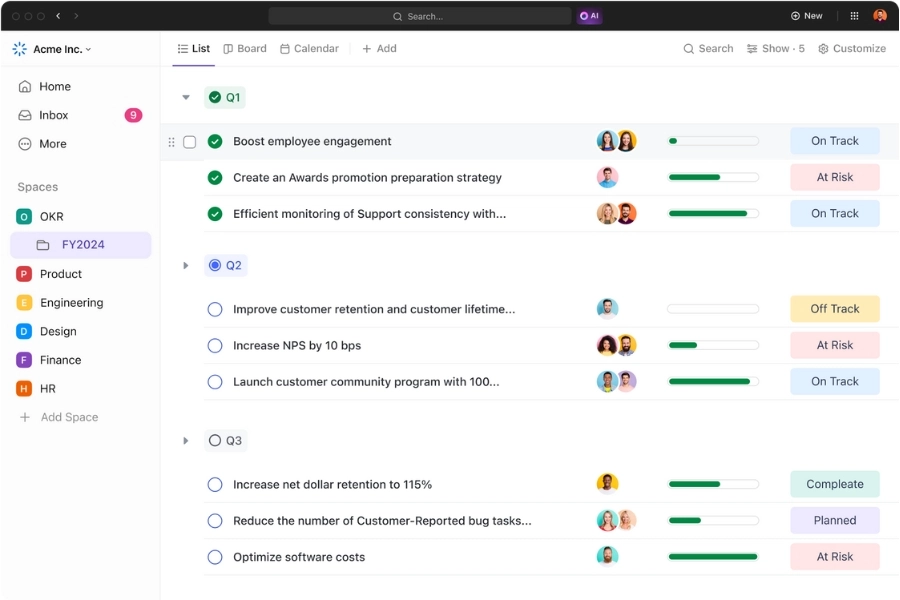
ClickUp
ClickUp is one of the most feature-rich free project management tools, offering task management, document collaboration, and automation. The free plan includes unlimited tasks and multiple views, including Gantt charts and Kanban boards.
Pros:
- Extensive features even in the free version
- Task automation included
- Built-in time tracking
Cons:
- Steep learning curve due to its complexity
- Reports of slow performance with larger teams
Available on: Web, Windows, macOS, iOS, Android, Linux
Notion
Notion combines task management with knowledge organization, allowing teams to create custom workspaces with wikis, databases, and task lists. It is ideal for teams that need documentation alongside project tracking.
Pros:
- Flexible workspace for organizing tasks and knowledge
- Unlimited pages and collaboration in the free plan
- Great for content teams and documentation-heavy projects
Cons:
- Lacks built-in Gantt charts and automation
- Less effective for teams needing strong real-time collaboration
Available on: Web, Windows, macOS, iOS, Android
Wrike
Wrike is a powerful project management tool designed for teams that need structured workflows and detailed reporting. The free version includes basic task management, real-time collaboration, and integrations with cloud storage services.
Pros:
- Customizable workflows for different project needs
- Real-time collaboration with document editing
- Integrations with Google Drive, OneDrive, and Dropbox
Cons:
- Free plan lacks Gantt charts and advanced reporting
- Limited storage and integrations in the free version
Available on: Web, Windows, macOS, iOS, Android
Paymo
Paymo is a lesser-known but effective project management tool, especially for freelancers and small teams. It offers task management, time tracking, and invoicing features, making it useful for businesses that need to manage projects and bill clients.
Pros:
- Built-in time tracking and invoicing
- Simple task management with lists and Kanban boards
- Free plan includes up to 10 users
Cons:
- No Gantt charts or advanced reporting in the free version
- Limited integrations compared to other tools
Available on: Web, Windows, macOS, iOS, Android
monday.com
monday.com provides an easy-to-use project management solution with customizable workflows, automation, and collaboration features. The free plan includes basic task tracking, file sharing, and limited integrations.
Pros:
- Customizable workflows for different industries
- Intuitive, user-friendly interface
- Collaboration tools like file sharing and team updates
Cons:
- Free plan is limited to two users
- No automation or advanced analytics in the free version
Available on: Web, Windows, macOS, iOS, Android

If you’re managing projects in a fast-paced environment, you might benefit from Agile Project Management: A Practical Guide for Teams and Businesses.
How to Choose the Right Free Project Management Tool?
With so many free project management tools available, choosing the best one depends on your team’s specific needs. Here are the key factors to consider when making your decision:
Team Size and Collaboration Needs
Some tools, like Asana and ClickUp, allow more free users, making them ideal for larger teams. Others, like monday.com, limit free accounts to two users. If your team relies heavily on real-time collaboration, consider tools with strong communication features like Wrike or Notion.
Project Complexity and Workflow
Different tools cater to different workflow styles. Trello is great for simple task tracking, while ClickUp and Wrike offer structured workflows with dependencies. If you need Gantt charts and timeline views, Asana and Wrike are better choices.
Advanced Features and Scalability
Even if you start with a free plan, consider whether the platform can scale with your needs. ClickUp offers automation and time tracking in its free plan, making it a strong long-term choice. On the other hand, some tools restrict key features, requiring an upgrade as your team grows.
Learning Curve
A powerful tool is only effective if your team can use it efficiently. Trello and monday.com have intuitive interfaces, while ClickUp and Wrike require more time to learn. If simplicity is a priority, go for a tool with a low learning curve.
Storage and File Sharing
If your projects involve a lot of document sharing, check the storage limits of free plans. Notion offers unlimited pages, making it great for documentation-heavy projects, while Wrike integrates well with cloud storage providers.

Final Thoughts
The best free project management tool depends on your team’s needs, workflow, and growth plans. If you want a simple visual tool, Trello is a great choice. For feature-rich project management, ClickUp and Asana offer strong free plans. If documentation and knowledge management matter, Notion is a standout. Choose wisely based on what will help your team work more efficiently.
A great free project management tool helps you organize tasks, streamline workflows, and boost productivity. But real success isn’t just about managing projects—it’s about fostering collaboration and keeping your team or community engaged. That’s where Beincom comes in.
While traditional project management tools focus on tasks, Beincom helps you create a thriving workspace where teams, creators, and businesses collaborate effortlessly. Whether you’re managing a project, leading a team, or growing an online community, Beincom ensures seamless communication and engagement beyond task management.
Ready to elevate your project collaboration? Sign up for Beincom and experience a smarter way to connect and work together.
Beincom