
An online community can look active on the surface and still feel completely silent.
Members are still there. The group still exists. Maybe people even read the posts. But no one replies, no one starts conversations, and every new update feels like it disappears into the void.
If that sounds familiar, your community is not necessarily dead. It may just be inactive.
The good news is that you do not always need to start over from scratch. In many cases, an inactive online community can be revived if you understand why members stopped participating and rebuild the habit of engagement step by step.
In this guide, we’ll walk through how to revive an inactive online community, from diagnosing what went wrong to re-engaging members, restarting conversations, and creating a simple 30-day plan to bring your community back to life.
Why Online Communities Become Inactive
An online community rarely becomes inactive overnight. Usually, engagement fades slowly: fewer replies, fewer member-started conversations, and less reason for people to check in.
Before trying to revive an inactive online community, it helps to understand what caused the drop. Common reasons include:
- Members no longer see a clear reason to return: People come back when the community gives them something useful, such as advice, support, learning, connection, opportunities, or a sense of belonging. When that value becomes unclear, they may stay in the group but stop participating.
- Conversations depend too much on the admin: If every discussion starts with the admin, the community becomes fragile. Once the admin slows down, the whole space can go quiet because members are used to waiting instead of starting conversations themselves.
- Content becomes repetitive: Members stop responding when every post feels the same. Repeated prompts, generic updates, or one-way announcements rarely give people a strong reason to reply.
- Members do not feel involved: A community needs more than passive readers. When members are not recognized, invited into discussions, or given a role in the space, they may stop seeing themselves as active participants.
- The community space creates friction: Too many channels, unclear topics, messy notifications, or outdated pinned posts can make participation harder than it needs to be. If people do not know where to ask, share, or respond, they may simply stop trying.
In most cases, inactivity does not mean the community is beyond saving. It usually means the space has lost clarity, rhythm, or relevance.
Signs Your Community Can Still Be Revived
Not every inactive community needs to be abandoned. Sometimes, the foundation is still there — it just needs a reset. Before you spend time rebuilding, look for signs that your community still has real potential.
People are still viewing content
If members are not replying, but your posts still get views, clicks, or reactions, that is a good sign. It means people have not completely left. They may be watching quietly, waiting for a more relevant reason to participate.
This is often called “lurking,” and it is not always bad. Many communities have silent members who still find value in the space. The goal is to understand what would make them comfortable enough to join the conversation again.
Some members still respond when contacted directly
If a few members reply when you message them privately, answer a survey, or respond when tagged, your community is not fully cold.
That small response matters. It shows there are still people who care about the topic or the relationship, even if they are no longer active in public discussions.
The community was active before
Past engagement is a useful signal. If people used to comment, share, ask questions, or join events, the community once had something that worked.
Look back at the period when the community was active. What topics got people talking? Who participated most often? What type of content created real conversations?
Those patterns can help you rebuild momentum.
Members still share the same pain point
A community becomes easier to revive when members still have a shared problem or goal.
Maybe they still want to learn, grow their business, stay updated, find support, or connect with people like them. If that shared need still exists, the community has a reason to come back.
The key is not to restart everything at once. Start by finding the people who still care, the topics that still matter, and the conversations that are easiest to rebuild.

How to Revive an Inactive Online Community
Once you understand why the community became inactive, the next step is to rebuild participation carefully. The mistake many community managers make is trying to “wake everyone up” with a big announcement or a sudden flood of posts.
That usually does not work.
To revive an inactive online community, you need to restart trust, relevance, and participation one layer at a time.
Step 1: Audit what stopped working
Before adding more posts or planning a comeback campaign, take a step back and look at what changed.
Go back to the period when the community was more active. Look at which posts received replies, which topics created conversations, and which members used to participate the most.
Also look for the point where engagement started dropping. Was it after a platform change? A shift in content? A long break from the admin? A major event in the industry?
This helps you avoid guessing. Instead of posting randomly, you can rebuild around what used to create real participation.
Step 2: Talk to inactive members directly
Analytics can show you what happened, but members can tell you why it happened.
Reach out to a small group of past active members and ask simple, honest questions. Keep it casual. You are not trying to run a huge survey yet — you are trying to understand what changed.
You can ask:
- What made you join the community in the first place?
- What would make this space useful for you again?
- Is there anything that made you stop participating?
Even a few replies can reveal patterns you would not see from analytics alone.
Step 3: Reposition the community promise
Sometimes the problem is not the members. It is that the community’s purpose has become too vague.
Members may not know what the space is for anymore, who it serves, or why they should come back. That is why you need to make the reason to participate clear again.
Try to summarize the community in one clear sentence:
“This community helps [specific audience] achieve [specific outcome] through [specific type of support or interaction].”
For example, instead of saying “a community for creators,” make it more specific: “a community where early-stage creators share launch ideas, get feedback, and find support before publishing.”
The clearer the promise, the easier it is for members to understand why the community matters.

Step 4: Restart with low-friction conversations
After a long, quiet period, asking members to jump into a deep discussion right away is usually too much.
Do not restart the community with a long essay, a complicated event, or a big strategic announcement. Silent members are more likely to reply when the prompt is simple and low-pressure.
Good low-friction prompts include:
- “What are you working on this week?”
- “What is one thing you are stuck on right now?”
- “Which option would you choose: A or B?”
- “What is one resource you found useful recently?”
The goal is not to create the perfect discussion immediately. The goal is to make participation feel easy again.
Step 5: Bring back core members first
A quiet community usually does not come back all at once. Every community has a few members who used to contribute more than others. Start with them.
Invite them into a small discussion, ask for their opinions, or give them early input on what the community should become. When a few familiar names begin showing up again, the space feels less empty and other members are more likely to follow.
Momentum usually starts with a small circle, not the entire audience.
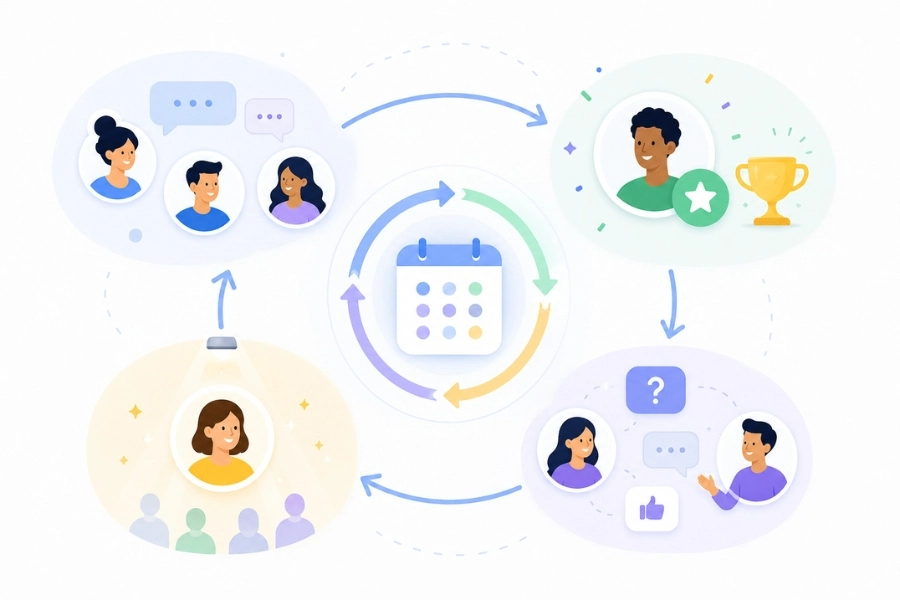
Step 6: Create recurring rituals
One good post can restart a conversation, but a repeated format helps rebuild the habit. A weekly check-in, monthly challenge, member spotlight, or regular Q&A thread gives people something predictable to engage with.
For example:
- Monday check-in: What are you focused on this week?
- Friday wins: Share one thing that went well.
- Monthly spotlight: Feature one member and their work.
- Office hours: Ask questions and get feedback.
Rituals work because members do not have to wonder when or how to participate. The rhythm is already there.
Step 7: Give members visible roles
If the community still depends entirely on the admin, it can go quiet again very quickly.
Give members small but visible ways to contribute. They could become topic hosts, moderators, mentors, event guests, resource contributors, or discussion starters.
This does not mean handing over the whole community. It simply means giving members a reason to feel responsible for the space, not just present in it.
Step 8: Clean up the community space
A messy community makes participation harder. If your community has too many dead channels, outdated pinned posts, or unclear discussion areas, members may not know where to go.
Clean up the space before asking people to return. Archive inactive channels, update your welcome post, pin useful resources, and make it obvious where members should ask questions or start conversations.
A cleaner structure reduces friction and makes the community feel active again.
Step 9: Track recovery signals
Measure real participation, not just member count. When reviving an inactive online community, growth is not the first metric that matters. A community can gain new members and still remain quiet.
Track signals that show people are actually coming back:
- replies per post
- returning active members
- member-started conversations
- questions asked by members
- comments from previously inactive users
- participation in recurring rituals
These signals tell you whether the community is becoming alive again, not just bigger.

What Not to Do When Reviving an Inactive Community
When a community goes quiet, it is tempting to do something big right away. A major announcement, a new event, a posting spree, a rebrand — anything that makes the space feel alive again.
But reviving an inactive online community is not about making noise. It is about rebuilding trust and participation. Here are a few mistakes to avoid.
Do not spam announcements
More updates do not automatically create more engagement. If members have already stopped responding, posting more announcements may make the community feel even more one-sided. People do not usually return because the admin is louder. They return because the space feels useful, relevant, or worth participating in again.
Instead of pushing constant updates, focus on starting conversations that invite simple responses.
Do not launch a big event too early
A large event will not fix a community that has no daily rhythm. Webinars, live sessions, and challenges can be useful, but only when there is already some level of interest. If the community has been silent for months, a big event may feel sudden and disconnected.
Start smaller first. Bring back conversations, reconnect with core members, and rebuild a basic engagement habit before asking people to join something bigger.
Do not blame members for being inactive
Inactivity is usually a signal, not a personal failure. Members are busy. They may have lost interest, missed updates, felt unsure where to participate, or stopped seeing value in the space. Blaming them only creates distance.
A better approach is to ask what changed and what would make the community useful again.
Do not keep posting generic content
Generic content rarely brings inactive members back. Posts like “How is everyone doing?” or “Any updates?” may feel easy to publish, but they often do not give people a strong reason to respond.
Make your prompts specific. Ask about a real challenge, a decision, a resource, or a current goal that matters to the members.
Do not focus on growth before fixing engagement
Adding new members will not solve a silent community.
If the existing community has no rhythm, new members will likely become inactive too. Growth only helps when the space already has clear value and visible participation.
Before inviting more people in, make sure the current members have a reason to stay, respond, and contribute.
Do not revive every channel at once
Trying to restart everything at the same time creates more confusion. If your community has multiple channels, topics, or groups, do not try to activate all of them immediately. That spreads your effort too thin and makes the community feel scattered.
Choose one or two key spaces first. Rebuild activity there, then expand once participation becomes more consistent.
A Simple 30-Day Plan to Revive Your Community
Instead of reading more theories, here is your day-by-day execution checklist. Turn these steps into a 4-week sprint to bring your silent community back to life.
Week 1: Diagnose the Problem
Goal: Identify why engagement dropped and locate your remaining community assets.
- Audit your analytics. Pinpoint the exact month when engagement started to decline.
- List 5–10 members who used to be the most active contributors.
- Review your top 5 historic posts with the highest comments to find your “winning topics.”
- Audit the layout. Identify dead channels, messy notification settings, and outdated pinned posts.
Week 2: Reconnect with Members
Goal: Re-engage core members privately and test the waters with zero-friction public content.
- Send casual 1:1 direct messages to the 5–10 past active members you identified in Week 1 to ask for their feedback.
- Rewrite your community promise into a single, hyper-focused sentence.
- Post your first public prompt after the silence. Use a simple poll or a one-sentence question (e.g., “Option A or B?” or “What are you stuck on this week?”). Do not post long announcements.
Week 3: Rebuild Community Rhythm
Goal: Establish predictable, recurring rituals so members build a habit of returning.
- Monday: Launch a fixed “Monday Check-in” thread to ask about weekly goals.
- Wednesday: Post a highly specific question addressing a shared pain point.
- Friday: Host a “Friday Wins” thread to encourage positive, low-pressure sharing.
- Weekend: Publish a “Member Spotlight” post to recognize and feature one active member.
Week 4: Expand & Clean Up
Goal: Remove friction from the space, empower core members, and measure your recovery.
- Archive all dead channels. Update your welcome post and pin fresh, valuable resources.
- Assign micro-roles. Invite 1 or 2 core members to host a discussion or share a specific resource.
- Review your data. Check whether replies-per-post and member-started conversations are trending upward.
Use this simple tracker to evaluate your community’s health before and after the 30-day sprint:
| Recovery Signal | Before 30 Days | After 30 Days | Status |
|---|---|---|---|
| Post views/lurker activity | Healthy / Needs tweak | ||
| Average replies per post | Healthy / Needs tweak | ||
| Member-started conversations | Healthy / Needs tweak | ||
| Returning core members | Healthy / Needs tweak | ||
| Questions asked by members | Healthy / Needs tweak | ||
| Participation in recurring rituals | Healthy / Needs tweak |
To keep your community thriving and deeply engaged, focus on building a strong community culture. Check out tips here: Building Community Culture: Why It Matters and How to Start
How to Keep Your Community Active After Reviving It
Bringing a quiet community back to life is only the first step. The harder part is keeping it active after the initial reset.
A community usually becomes inactive again when the same old patterns return: unclear purpose, admin-only posting, repetitive content, or too many passive members. To avoid that, you need a simple system that keeps participation easy and worthwhile.
Keep the community purpose visible
Members should always understand why the community exists and what they can get from being there.
This does not mean repeating your mission statement every week. It means making sure your content, discussions, events, and member interactions all point back to the same core promise.
If your community helps creators launch better content, keep the conversations around feedback, ideas, examples, and progress. If it helps professionals learn a skill, make sure the space consistently gives them practical learning opportunities.
When the purpose is clear, members know when to return and what to participate in.
Balance admin-led and member-led activity
A community should not depend entirely on the admin to stay alive.
Admin-led content is useful for setting direction, starting discussions, and keeping the space organized. But if every post comes from the same person, members may stay in audience mode instead of becoming active participants.
Encourage members to ask questions, share resources, host small discussions, or respond to each other. Even small member-led actions can make the community feel more alive.
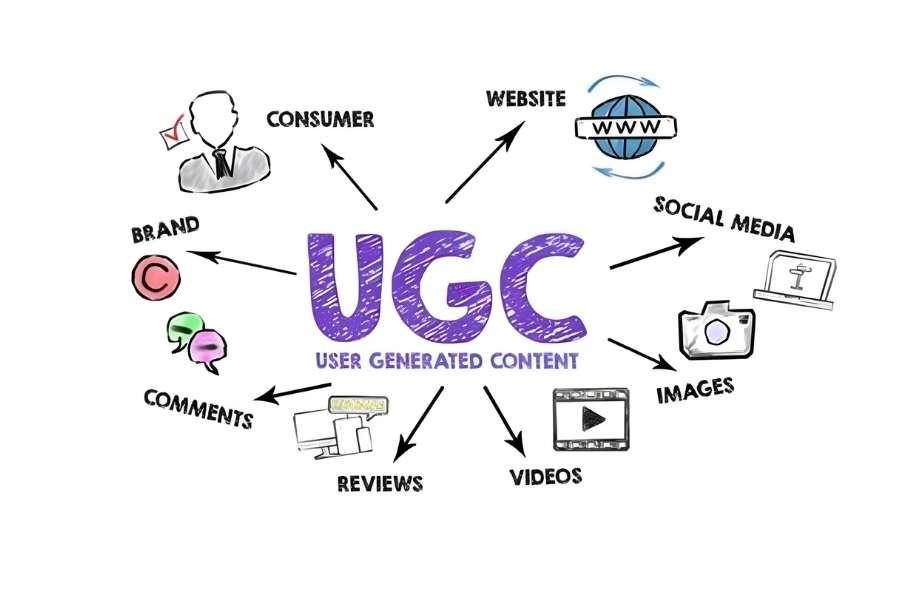
While driving UGC is essential, effective moderation is crucial to sustaining a healthy community. Learn more at: Community Moderation Tips & Tricks: How to Build a Safe Online Space?
Recognize people who contribute
People are more likely to keep participating when their effort is noticed.
This can be simple. You can thank someone for a thoughtful answer, highlight a helpful comment, feature a member’s progress, or mention people who consistently support others.
Recognition does not need to feel formal or forced. The point is to show members that their participation matters.
Refresh topics before they get stale
Even strong communities can lose energy if the conversations become too predictable.
Review your recurring posts and discussion topics regularly. If a weekly thread stops getting replies, change the format. If members keep asking about a new challenge, turn that into a focused discussion or mini-event.
A good community rhythm should feel familiar, but not boring.
Review engagement signals regularly
Do not wait until the community goes silent again before checking what is happening.
Set a simple monthly review. Look at which conversations got replies, who participated, which channels stayed quiet, and whether members are starting discussions without being prompted.
The goal is not to track every metric. It is to notice early signs of fading engagement before they become a bigger problem.
Keeping a community active is less about constant posting and more about creating reasons for people to return, participate, and feel connected over time.
For more tips to keep your communities engaging, check out: 10 Best Community Engagement Strategies for Modern Groups
FAQs
Q1. How do you know if an online community is inactive?
An online community is inactive when members stop starting conversations, replying to posts, joining discussions, or returning regularly. The community may still have members, but there is little visible participation.
Q2. Can an inactive online community be revived?
Yes, an inactive online community can often be revived if members still care about the topic, the community still solves a real problem, and there are signs of remaining interest, such as post views, reactions, or responses from core members.
Q3. How long does it take to revive an inactive online community?
It depends on how inactive the community is, but a 30-day reset is a practical starting point. The first month should focus on diagnosis, reconnecting with core members, restarting simple conversations, and rebuilding participation habits.
Q4. Should you delete an inactive online community and start over?
Not always. If the audience, topic, and original purpose are still relevant, it is usually worth trying to revive the existing community first. Starting over only makes sense when the community was built around the wrong audience, unclear value, or a topic people no longer care about.
Q5. What should you post in an inactive online community?
Start with low-friction posts that are easy to answer. Simple check-ins, polls, quick questions, member spotlights, and “what are you working on?” prompts usually work better than long announcements or complex discussions.
Conclusion
An inactive online community is not always a failed community. Sometimes, it is a community that has lost its rhythm, clarity, or reason for members to participate.
The best way to revive an inactive online community is not to post more for the sake of posting. Start by understanding what changed. Look at past engagement, talk to members, and find out whether the original purpose still matters to them.
From there, rebuild slowly. Bring back core members first, restart easy conversations, create simple recurring rituals, and make the space easier to navigate. Once people begin responding again, shift the community from admin-led activity to member-led participation.
A healthy community does not stay active because one person keeps pushing content into it. It stays active because members feel there is a reason to return, contribute, and connect with others.
If you can create that reason again, your community has a real chance to come back to life.
Beincom is a Web3-powered community platform where people can connect, join meaningful conversations, and earn from active participation. Sign up today and start building a more engaged community.
Beincom


