

In the modern workplace, time is the most valuable resource. With growing demands, distributed teams, and rising pressure to perform, boosting employee productivity is more important than ever. That’s where Artificial Intelligence (AI) steps in.
AI tools are revolutionizing how we work — automating repetitive tasks, improving decision-making, and freeing up teams to focus on creative, strategic work. Whether you’re in marketing, sales, development, or support, there’s an AI-powered solution to help your team work faster and smarter.
In this guide, we’ve handpicked the best AI tools to improve employee productivity in 2025, organized by category. From AI writers and scheduling assistants to meeting transcribers and coding copilots — discover the tools that can transform your workflow.
How AI Tools Enhance Productivity at Work
Before diving into the list, let’s explore how AI directly improves productivity across industries and roles.
- Automates Repetitive Tasks: AI handles time-consuming manual work like data entry, transcription, and email sorting — allowing employees to focus on higher-impact tasks.
- Enhances Decision-Making: AI-powered analytics provide quick insights from complex data, helping teams make better, faster decisions based on real-time information.
- Streamlines Communication: Smart AI assistants summarize meetings, translate messages, and enhance team collaboration across locations and time zones.
- Boosts Focus and Time Management: AI scheduling tools optimize calendars, reduce meeting overload, and protect deep work time for individuals and teams.
- Empowers Creativity and Innovation: From generating content ideas to designing visuals or writing code, AI boosts creative output without compromising quality.
Did You Know? According to McKinsey, companies using AI tools report a 30–45% increase in productivity in areas like marketing, operations, and support.
Next, let’s explore the best AI tools — categorized by function — to help you identify the right solutions for your team.

Best AI Tools to Improve Productivity
With thousands of AI tools on the market, choosing the right ones can be overwhelming. To help you get started, we’ve curated a list of the best AI tools across key productivity categories: writing, scheduling, meetings, analytics, support, design, and more.
Each tool on this list was selected for its real-world impact on employee efficiency, ease of use, and proven ability to streamline workflows. Whether you’re a solo entrepreneur or leading a large team, these AI tools can make a measurable difference in your daily output.
AI Writing & Content Creation Tools
Whether it’s writing emails, creating blog content, or generating marketing copy, AI writing tools save time while enhancing clarity and creativity. Here are three of the best options in 2025:
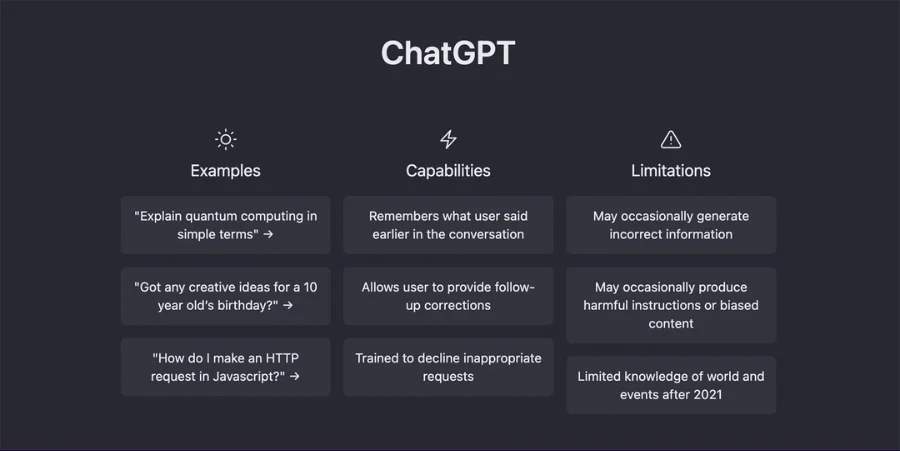
ChatGPT (by OpenAI)
Best for: Idea generation, content drafting, brainstorming, summarization
ChatGPT is a conversational AI tool that can help you write faster, smarter, and with more confidence. Powered by advanced language models, it assists in generating everything from emails and blog posts to marketing copy and meeting notes. Teams use it daily to overcome writer’s block, rephrase complex content, and even automate customer communication.
Key productivity benefits:
- Quickly draft messages, documents, and reports
- Summarize long texts or meeting transcripts
- Generate content ideas or outlines in seconds
- Improve clarity and tone with rewording suggestions
Pro Tip: Use custom instruction and prompts to tailor ChatGPT’s tone, format, and output to your team’s brand voice.
Grammarly
Best for: Real-time grammar correction, tone improvement, writing clarity
Grammarly goes beyond spellcheck. This AI-powered writing assistant analyzes your text and offers intelligent suggestions for grammar, punctuation, tone, and clarity. It’s perfect for ensuring that all internal and external communication is polished and professional.
Key productivity benefits:
- Instant writing corrections inside email, docs, and messaging apps
- Suggestions based on tone, intent, and audience
- Plagiarism detection and citation tools (premium version)
- Team analytics dashboard to track writing performance
Use Case: Teams in HR, customer service, or legal departments save hours each week editing critical communication with Grammarly.
Jasper
Best for: Marketing content, ad copy, landing pages, SEO writing
Jasper is a powerhouse for marketers who need high-converting content — fast. Trained on proven marketing frameworks, it can create blog articles, social media posts, product descriptions, and email sequences with minimal input. It also supports brand voice customization and collaboration for content teams.
Key productivity benefits:
- Generate marketing copy in minutes
- Pre-built templates for ads, headlines, and sales pages
- Supports multiple languages and tones
- Integrates with Surfer SEO for keyword-optimized writing
Why it’s powerful: Jasper helps content teams publish 3x more output without sacrificing creativity or quality.
AI Task & Time Management Tools
AI-powered scheduling and task management tools help employees stay focused, meet deadlines, and protect deep work time — without the chaos of manual planning. These tools use intelligent algorithms to automatically prioritize, reschedule, and organize your day for maximum output.
Here are 3 standout tools that can revolutionize how your team manages time and tasks:
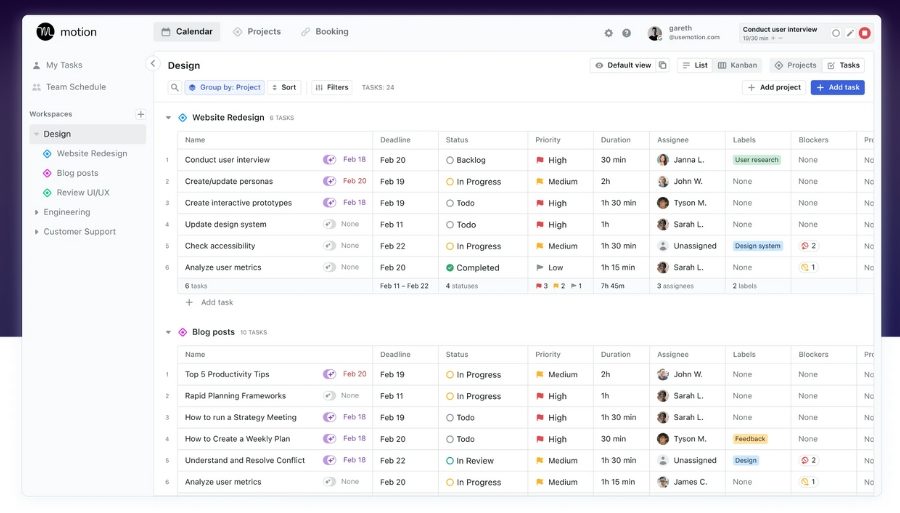
Motion
Best for: Automated daily scheduling, calendar blocking, task prioritization
Motion is an AI-powered productivity app that plans your entire day for you. It intelligently schedules tasks, meetings, and deadlines into your calendar based on priority, duration, and availability — all in real time. It’s ideal for busy professionals who want to reduce mental clutter and make time for what matters most.
Key productivity benefits:
- Automatically rearranges your calendar as priorities shift
- Creates time blocks for focused, uninterrupted work
- Integrates with Google Calendar, Outlook, and task tools
- Reduces context switching and improves time awareness
Real Impact: Motion users report reclaiming 2–3 hours per day by offloading scheduling to AI.
Clockwise
Best for: Smart meeting scheduling, team calendar coordination
Clockwise is built for teams that suffer from meeting overload. This AI tool optimizes calendars across teams, finding the best time slots for meetings while protecting deep work time. It works quietly in the background, aligning everyone’s schedules with minimal disruption.
Key productivity benefits:
- Automatically reschedules meetings to minimize interruptions
- Protects “focus time” blocks for uninterrupted work
- Syncs across Google Workspace with smart calendar logic
- Provides insights into time allocation and productivity trends
For Teams: Clockwise is especially valuable for product, engineering, and operations teams who rely on focused work hours.
Reclaim.ai
Best for: Smart time blocking, task syncing, habit tracking
Reclaim.ai blends AI scheduling with habit formation. It not only books tasks and meetings into your calendar but also helps build and protect healthy routines — like lunch breaks, exercise, or daily planning. It adapts to your schedule dynamically and helps you make time for both work and wellness.
Key productivity benefits:
- Auto-blocks time for tasks, routines, and personal goals
- Adjusts in real time to scheduling conflicts
- Syncs tasks from tools like Asana, Todoist, and Google Tasks
- Analytics dashboard shows how time is used
Unique Angle: Reclaim isn’t just about working more — it’s about working sustainably.
AI Meeting & Communication Tools
Meetings are essential — but they can also be productivity killers if not managed well. AI tools now help teams capture, summarize, and streamline communication across time zones, reducing manual note-taking and miscommunication.
Here are 3 powerful AI tools that enhance meetings and workplace communication:
Otter.ai
Best for: Meeting transcription, real-time notes, automated summaries
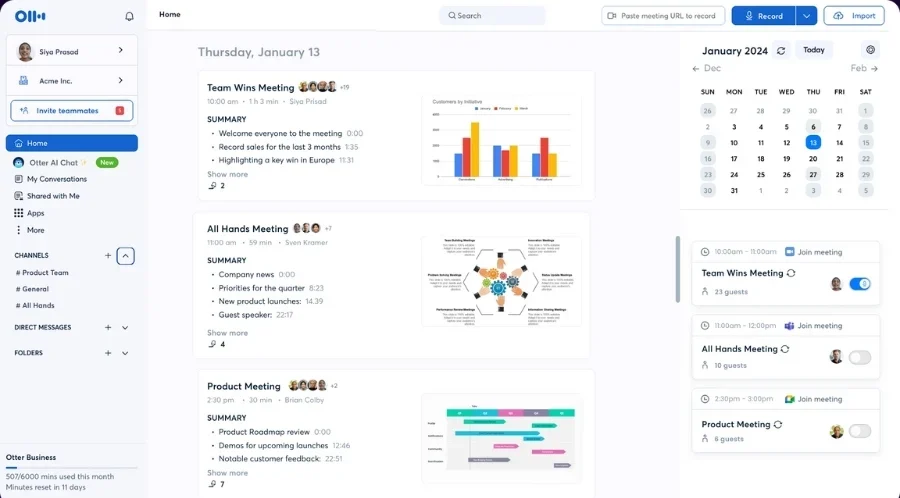
Otter.ai is a smart voice transcription tool that records, transcribes, and summarizes meetings automatically. Whether you’re in Zoom, Google Meet, or Teams, Otter captures conversations in real-time and creates searchable notes you can refer back to later.
Key productivity benefits:
- Live transcription and note-taking during meetings
- Automated summaries with key points and action items
- Searchable transcripts for quick reference and follow-ups
- Team collaboration on shared meeting notes
Real Use Case: Sales, product, and HR teams use Otter to ensure nothing gets missed — even when multitasking.
Fireflies.ai
Best for: Recording meetings, extracting insights, sharing action items
Fireflies.ai records and analyzes voice conversations across meetings, creating smart summaries and actionable insights. You can search across all past conversations, identify who said what, and pull out key decisions or questions instantly.
Key productivity benefits:
- Works with all major conferencing platforms
- Tags action items, questions, and topics using AI
- Team workspaces for storing and sharing call insights
- AI-powered search across transcripts and meetings
Time Saver: Fireflies helps managers and team leads quickly align on meeting outcomes without rewatching full recordings.
Krisp
Best for: Noise cancellation, voice clarity in remote meetings
Krisp uses real-time AI to remove background noise, echo, and distractions from calls — making remote meetings smoother and more professional. It works seamlessly with Zoom, Skype, Slack, and other voice tools, ensuring crystal-clear communication even in noisy environments.
Key productivity benefits:
- Removes ambient noise and keyboard sounds
- Enhances voice quality for both sides of the call
- Reduces meeting fatigue and improves focus
- Lightweight and works across most devices
Why it matters: Clear audio means fewer misunderstandings and faster decisions — especially in remote or hybrid teams.
AI Data Analysis & Decision-Making Tools
Data drives decisions, but analyzing it manually can be time-consuming and error-prone. AI-powered analytics tools simplify complex data, visualize patterns, and deliver actionable insights — helping teams make smarter decisions, faster.
Here are standout tools transforming data analysis and reporting:
Tableau with Einstein GPT
Best for: AI-enhanced data visualization and business intelligence
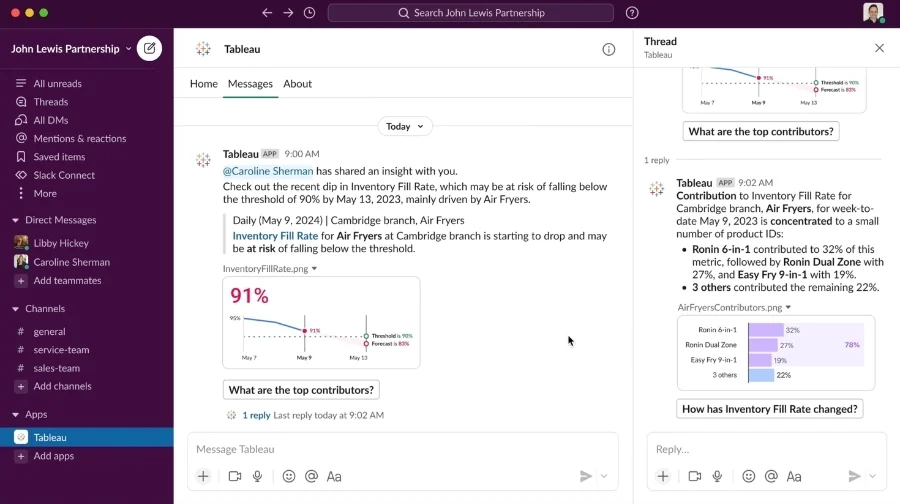
Tableau is a leading data visualization platform — and with the integration of Einstein GPT (from Salesforce), it now brings conversational AI directly into your dashboards. Users can ask natural language questions and get visualized data responses instantly.
Key productivity benefits:
- Create interactive dashboards without coding
- Use natural language to generate data visualizations
- AI-generated summaries and predictive trends
- Seamless integration with Salesforce and other data sources
Real Impact: Teams in sales, marketing, and operations use Tableau to turn raw data into clear, decision-ready visuals.
Polymer Search
Best for: No-code AI dashboards and data exploration
Polymer turns messy spreadsheets and CSV files into beautiful, dynamic dashboards — no technical skills needed. It uses AI to automatically categorize, filter, and surface insights, making data exploration easy for non-technical teams.
Key productivity benefits:
- Auto-generates dashboards from Google Sheets or Excel
- AI detects trends, outliers, and key data points
- Filters and drill-downs are created automatically
- Perfect for startups, marketing teams, and educators
MonkeyLearn
Best for: Text analysis, customer feedback, sentiment detection
MonkeyLearn uses machine learning to analyze unstructured text data — like survey responses, reviews, social media comments, and support tickets. It helps teams understand what customers are saying and why, with easy-to-build models for sentiment, intent, and more.
Key productivity benefits:
- AI-powered sentiment and keyword analysis
- No-code setup for custom text classification
- Integrates with Google Sheets, Zapier, and CRMs
- Ideal for customer service, product, and marketing teams
Why it’s useful: Stop guessing what your users want — analyze their actual words at scale.
AI Tools for Customer Support & Internal Helpdesks
Customer support and internal helpdesk requests can overwhelm teams, especially as a company scales. AI tools help by automating responses, routing tickets, and offering 24/7 assistance — reducing workloads while keeping satisfaction high.
Here are three leading AI tools helping support teams work faster and smarter:
Zendesk AI
Best for: Smart ticket routing, auto-replies, customer intent prediction
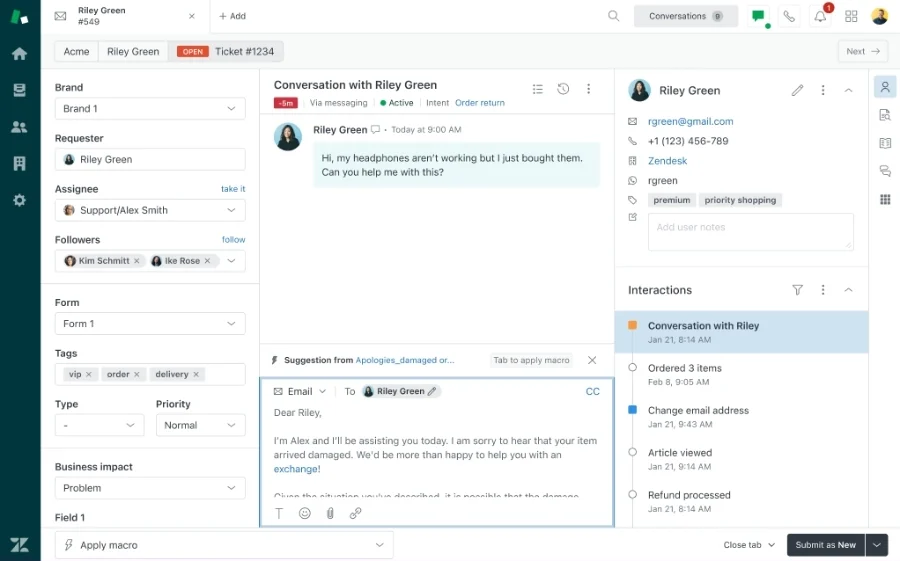
Zendesk has long been a leader in customer support software — and with its integrated AI, it now helps teams resolve tickets faster. The AI can analyze incoming tickets, predict user intent, suggest responses, and even handle common queries without human input.
Key productivity benefits:
- Automatically triages and categorizes support tickets
- Suggests replies based on past solutions and sentiment
- Enables AI-powered chatbots for self-service support
- Reduces first-response and resolution times
Pro Insight: Zendesk AI is especially helpful for high-volume teams who want to scale without sacrificing quality.
Intercom Fin (AI Agent)
Best for: AI-powered chat support, onboarding, proactive engagement
Intercom’s “Fin” is an AI chatbot designed to handle real conversations. It uses natural language understanding and deep learning to accurately resolve common queries, assist with onboarding, and escalate complex cases to humans when needed.
Key productivity benefits:
- Resolves up to 50% of support queries automatically
- Learns from your knowledge base and past chats
- Seamless handoff to human agents when necessary
- Boosts customer satisfaction while cutting response workload
Bonus: Fin integrates tightly with Intercom’s Messenger, so it feels like a natural extension of your team.
Tidio
Best for: Small to medium businesses needing AI chat + live support
Tidio combines live chat and AI automation in a single, affordable platform. Its chatbot can qualify leads, handle FAQs, recommend products, and direct users to the right person — making it ideal for customer service, ecommerce, and sales.
Key productivity benefits:
- AI chatbot builder with no coding required
- Works on websites, Messenger, Instagram, and email
- Multi-language support for global customers
- Tracks visitor behavior to trigger smart responses
Great for ecommerce: Tidio helps reduce cart abandonment and increase sales through real-time support.
AI Tools for Design & Creative Workflows
Canva Magic Studio
Best for: AI-enhanced graphic design, brand templates, and content generation
Canva has added powerful AI capabilities under its Magic Studio, enabling anyone — designer or not — to create stunning visuals with speed. With features like Magic Write, Magic Design, and Magic Edit, Canva now blends creativity with automation.
Key productivity benefits:
- Magic Write: AI copywriting for captions, ads, and headlines
- Magic Design: Auto-generates templates based on your input
- Magic Edit & Erase: Instantly modify or clean up images
- Great for social media, presentations, and marketing teams
Why it works: Canva’s intuitive drag-and-drop UX + AI = fast, brand-consistent visuals with minimal effort.
Adobe Firefly
Best for: High-quality AI image generation, brand-safe creative production
Adobe Firefly is Adobe’s response to generative AI in design. It enables teams to generate images, textures, and effects using simple text prompts — all while keeping the output commercially safe and aligned with brand aesthetics.
Key productivity benefits:
- Text-to-image, text-to-vector, and style transfer capabilities
- Integrated across Adobe apps like Photoshop, Illustrator, and Express
- Generates high-res, editable assets
- Ensures ethical use and avoids copyright issues
Ideal For: Designers who want powerful AI generation inside trusted pro tools.
Runway
Best for: AI video editing, content repurposing, and multimedia creation
Runway is at the cutting edge of AI video creation and editing. It lets users generate short videos, replace backgrounds, edit scenes, and even animate text with minimal editing skills — perfect for content creators and marketers on tight deadlines.
Key productivity benefits:
- Text-to-video generation from simple prompts
- Automatic background removal and object tracking
- Tools for motion design, image expansion, and color correction
- Collaborative workspace for teams
Marketing Win: Great for creating ads, social clips, and branded content without needing a production team.
How to Choose the Right AI Tools for Your Team
With so many AI-powered productivity tools out there, the hardest part isn’t finding them — it’s figuring out which ones actually work for your team. Here’s a simple checklist to help you choose the right AI tools:
- Pinpoint your team’s biggest productivity blockers.
Start by identifying where your team loses the most time. Are repetitive tasks slowing everyone down? Is content creation taking too long? Are data reports a bottleneck? Knowing the exact problem helps you match it with the right AI solution. - Look for tools that integrate with your current workflows.
The best tools fit into what you’re already using — not force you to change everything. Make sure they connect easily with your existing tools like Slack, Google Workspace, Notion, or Trello to minimize friction. - Choose AI with a short learning curve.
Even the most powerful AI is useless if nobody wants to use it. Prioritize user-friendly tools with clean interfaces, helpful tutorials, and low or no-code functionality so your team can get value quickly — without extra training. - Check for data privacy, compliance, and security.
Many AI tools interact with sensitive internal data. Always review their security practices, data usage policies, and whether they comply with GDPR or your industry standards. Trust and transparency matter. - Think about scalability and ROI.
A tool might work for a team of 5 — but will it still deliver value when you’re a team of 50 or 500? Look for platforms with pricing and features that grow with you, and test for a clear return on investment in time saved or work delivered. - Prioritize tools that learn and improve over time.
Great AI adapts to your use case. Look for platforms with customizable models, automatic updates, and features that get smarter as you use them. This ensures your investment stays relevant as your team and workflows evolve.
Pro Tip: Start small. Test one or two AI tools that solve high-impact problems first, gather feedback from your team, and scale your AI stack only once you’re confident in the results.
Read more: Top Productivity Tools to Boost Team Performance in 2025
Final Thoughts: Work Smarter with AI — and Beincom
The best AI tools can dramatically improve productivity across content creation, meetings, project management, and support. But to truly streamline your team’s collaboration, it takes more than just individual tools — it takes the right platform.
Beincom is a next-gen social community platform designed to enhance communication and collaboration — all powered by AI. From smart content suggestions to automated quizzes, Beincom integrates productivity and social interaction in one seamless ecosystem.
Discover how Beincom combines AI and community to help your team work better, faster, and smarter today!


